Save time for jobs that you do frequently by setting up job templates. Preset everything about your job from description, diary notes and attachments, items/services and pricing. Great for making sure your job checklists / job forms are done correctly every job. Job templates can be activated from the ServiceM8 addons section.
Get Control of your Business
The following are simple tips that when applied should increase your quote winning ratio.
- Make it look professional
- Your quote is the first example of your quality of work. Have a professional looking quote and you will win more work and can be more expensive.
- Quote fast
- Your chances of winning work are exponentially better the faster you respond.
- Our statistics show that you increase your chances of winning work by up to 25% if you quote within the first 24 hours.
- Follow up
- 60% of quotes are never followed up.
- Following up works, its a secret weapon of all good sales teams.
- Track your win/lose ratio
- Do you need more enquiries or do you need to convert more enquiries?
- If you are winning all your jobs chances are you are too cheap.
- Is your marketing targeted correctly are you getting the right customers enquiring?
- Customer testimonials
- They will put you ahead of your competition!
- Look at how movies, books, Infomercials etc. use testimonials successfully.
- Testimonials inspire confidence in your product or service.
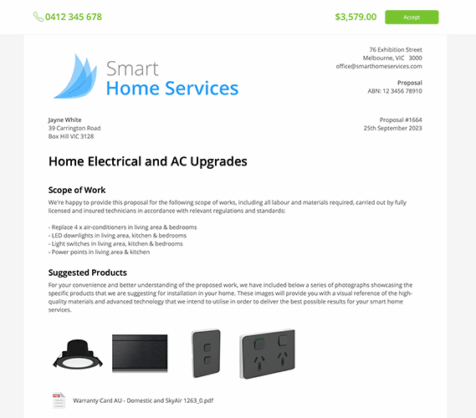
- Explain the work you will do for the customer
- Outline what they asked for, this gives the customer confidence that you know what they requested.
- Outline what the job outcome will be, ensures there is no misunderstanding of what you are providing.
- Make it easy to accept the quote
- Give them easy options
- an email to reply to with the quote number
- easy to find phone number
- Tell them what to do
- Follow up!
- Give them easy options
- Quote optional extra’s
- Customers can’t spend more if you don’t offer it
- Its a great easy way to increase your total on each job
- It gives the customer more options – options that might put you ahead of your competition
- Show examples of your best work
- This proves to your customer that you can deliver a high quality service or product.
Once you’ve updated to the latest ServiceM8 app, you can now tag photos. Tags are short text phrases that can be anything from ‘Before job’ or ‘After job’, to a reference to where on the clients site the photo was taken.
As always, tags will be stored with photos in the job diary for future reference.
How often have you had a mobile number but no email address for a client? Or how often have you taken down an email incorrectly and spent time calling the client to get their email so you can invoice them.
With SMS invoicing that’s a thing of the past, now you can easily send invoices to customers with only a mobile phone number from your iPhone or iPad – and while email can disappear into spam filters, you know they’ll get your sms invoice.
This new timesheet report gives you clear insight into a staff members activity between a given period, including a breakdown of the jobs a staff member was checked into or scheduled for, lunchbreaks and clock on/off times.
Find it under the reports menu in your account.
Xero is easy to use online accounting software that’s designed specifically for small businesses.

• It’s all online, so you can work when and where you want to. Just login with your PC, Mac or mobile.
• Your bank statements are automatically imported and categorized, letting you see your cashflow in real-time.
• Invite your team and work together on financials. You can collaborate over your up-to-date numbers.
• Xero has all you need to run your business – including invoicing, paying bills, sales tax returns, reporting and much more.
Best of all – ServiceM8 now integrates with Xero. Find out more about ServiceM8 + Xero.
This month we’re excited to introduce the ServiceM8 Inbox. Inbox is a faster way to convert emails directly into new jobs. Now you can forward job related emails directly into ServiceM8 including all attachments, If the email is from an existing client it will even automatically assign the job to them.
Find the inbox on the ServiceM8 addons page or read more about it here.
This month we’re excited to announce our latest ServiceM8 add-on - Forms. Create and complete quick question and answer forms as part of any job. Great for anything from customer approval forms to warranty receipts, vehicle maintenance checklists and even JSA’s. As always, forms will be stored in the job diary for your records.
To activate forms, visit the ServiceM8 addon directory inside your account.
This month we’re excited to announce the ServiceM8 Partner Program.
Don’t have the time to learn ServiceM8 at your own pace? Hit the ground running by getting setup and training assistance from one of our partners. Visit the partner directory for more information.
Introducing job allocations – a new way to schedule jobs without a specific booking date/time. Simply drop jobs onto staff as urgent / morning / afternoon or even anytime. Great for after-hours work, or where access to a job site is available during business hours and doesn’t need an exact booking time.
Find out more about the job allocations addon here.